
Website Conversion Rate: How One DFW Company Went From 4.62% to 12.61%
What's a good website conversion rate for a small business? How to calculate yours, and the fixes that took one DFW company from 4.62% to 12.61%.


"We get traffic. The phone just doesn't ring."
I hear some version of that every week from owners of plumbing companies, med spas, CPA firms, roofers. They've paid for a website. Analytics says people are showing up. And almost none of those people call.
That's a website conversion rate problem, and in almost every case I've seen it's cheaper and faster to fix than a traffic problem (even though traffic is what every agency on earth will try to sell you first).
In the final 30 days of its first year on a rebuilt site, a commercial services company in DFW converted 12.61% of its visitors into form submissions. Roughly one in eight. The typical small business site? Somewhere between 1% and 3%.
So let's get into it. How to find your own number. What counts as good. And what that company actually changed to get there.
What is a website conversion rate?
Conversion rate is just this: out of every 100 visits to your site, how many end in something that could turn into money? For a local business that means somebody called, filled out the quote form, or booked a time. Nothing else.
The math:
Conversions ÷ visits × 100 = conversion rate
So 16 form submissions from 127 visits is 12.6%. And 92 conversions from about 2,000 visits is 4.6%.
Two things to settle before you calculate anything.
First, decide what counts. Newsletter signups don't pay your crew. Neither do clicks on your Facebook icon. Count calls, forms, and bookings. That's it.
Second, make sure you're actually tracking all three. Most sites I look at track forms (sometimes) and calls never. If half your customers tap to call and you only count forms, your real conversion rate is roughly double what your report says, and you have no idea which pages are doing the work.
What's a good website conversion rate for a small business?
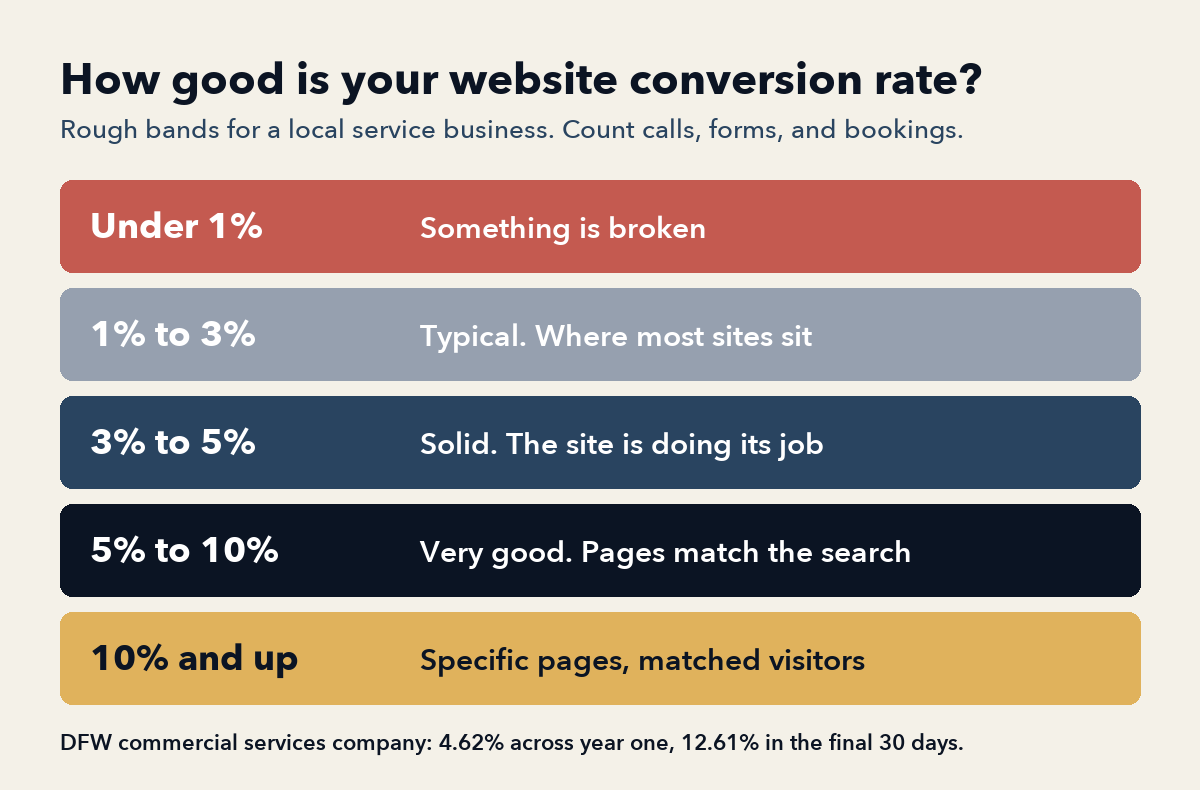
Here's roughly how I'd grade a local service business site:
- Under 1%: Something is broken. Usually the phone number is hard to find on mobile, or the traffic is the wrong traffic.
- 1% to 3%: Typical. This is where most small business websites sit, and typical is not good.
- 3% to 5%: Solid. The site is doing its job.
- 5% to 10%: Very good. You've matched your pages to what people are searching for.
- 10% and up: Possible on specific pages, with visitors who landed exactly where they meant to.
Treat these as rough bands, not a law. How you count matters too: a site that tracks calls and forms will always look better on paper than one that only counts forms, even if the two sites are identical. An emergency plumber should convert higher than a kitchen remodeler, because nobody with water coming through the ceiling is comparison shopping for three weeks.
Why your conversion rate matters more than your traffic
Run this with me.
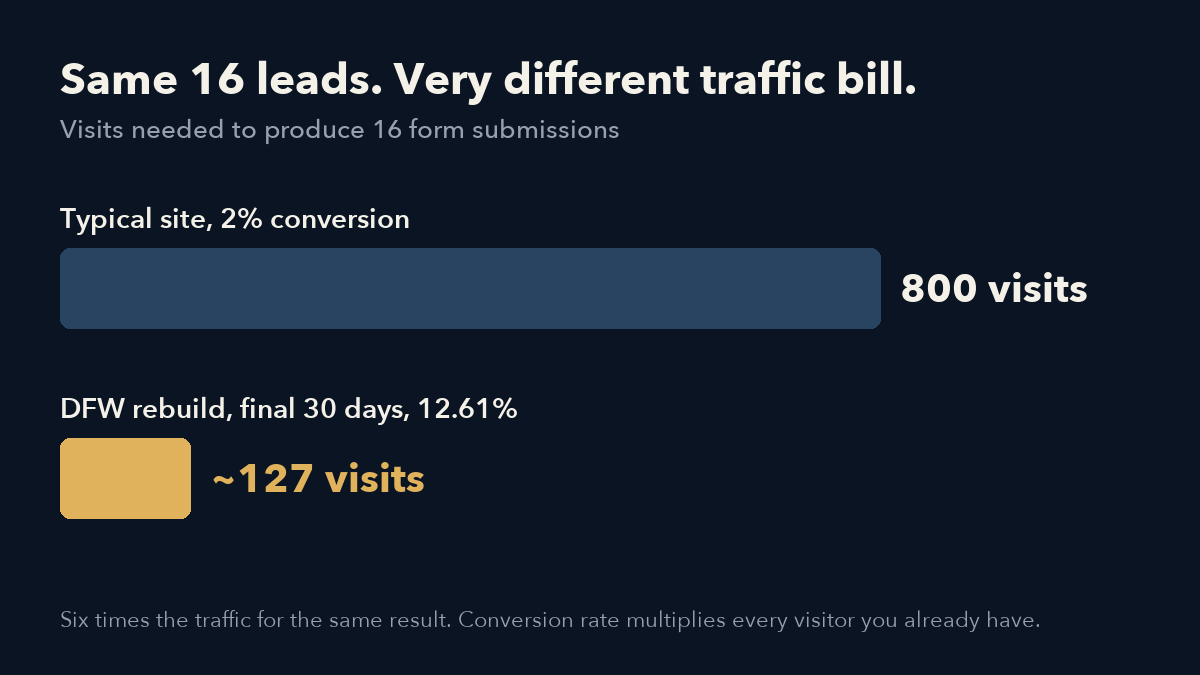
That DFW company got 16 form submissions in the final 30 days of year one at 12.61%. Work it backward and that's somewhere around 127 visits for the whole month.
Now put a typical 2% site in the same spot. It needs 800 visits to produce those 16 leads.
Same leads. Six times the traffic.
Traffic is expensive. You either pay for it in ad spend every single month, or you earn it slowly over six to twelve months of pages, reviews, and Google Business Profile work (which is worth doing, but it isn't quick). Conversion rate multiplies every visitor you already have. Lifting a site from 2% to 4% does the same thing for your lead count as doubling your traffic, and it usually costs a fraction as much.
This is why I get twitchy when an owner's first question is "how do I get more traffic?" Sometimes that's the right question. Usually it's the second one.
The DFW company: from locked out to 12.61%
Quick backstory (the full version is in what a small business website should cost).
A family-owned commercial services company in the Dallas-Fort Worth area had a one-page website. Their agency built it, then went out of business and took the login with it. No access. Couldn't change a phone number. Five service lines crammed onto a single page, selling to property managers and facilities teams across North Texas.
I got the keys back through the hosting provider, then rebuilt it. Year one:
- Website visitors up 306.8%
- 92 conversions at a 4.62% conversion rate across the full year
- The final 30 days: 16 form submissions at 12.61%, nearly three times the year's average
- New enterprise clients, including a city government, a large energy provider, and a large restaurant chain
Look at the shape of that. The rate climbed as the year went on. The site didn't get prettier in month eleven. It got more specific, and the visitors it pulled in got better. Here's what produced that.
7 ways to increase your website conversion rate
In roughly the order I'd do them.
1. Give every service its own page
This is the biggest one, and it's the One-Page Trap from the Business in a Box Playbook.
Somebody searches "commercial pressure washing Fort Worth." If they land on a page about exactly that, with photos of exactly that, they call. If they land on a homepage that lists five services in a paragraph and a family history, they hit the back button and call the next result.
The DFW rebuild split one page into a dedicated page for each of the five service lines, each written the way property managers actually search. More than anything else that year, that decision drove both the traffic and the conversions.
2. Send ads to the matching page, never the homepage
If you're running Google Ads to your homepage, you're paying for a click and then making the visitor go find what they searched for. Plenty of them won't.
Every campaign for that company pointed at the service page that matched the search. Pressure washing ads went to the pressure washing page. That's it. No clever landing page software. (The rest of how I set up small local budgets is in the Google Ads for small business post.)
3. Pass the Dripping Ceiling Test
Pull your site up on your phone. Pretend you're a homeowner standing in a hallway with water coming through the ceiling. Count the seconds until you can tap a phone number.
Over three seconds costs you jobs. Most sites I test take fifteen. A few never get there at all, because the phone number is part of an image and can't be tapped.
The fix is boring. Put a click-to-call button at the top of every page and make it stick to the screen on mobile as people scroll. Your visitors are mostly on phones anyway (and plenty of them hate typing).
4. Cut your form down to three fields
Name. Phone. What do you need.
Every extra field loses people. It's tempting to add "preferred contact time," "property type," and "how many square feet" because the info would be nice to have, but each one is another reason for a person on a phone in a parking lot to give up halfway through. "How did you hear about us?" is a question for the phone call, not the form. So is the budget dropdown. Put the form on every page, too, so nobody has to go hunting for your contact page to reach you.
5. Put proof above the fold
A review. A star rating. A recognizable local client. A number.
Something on the first screen that tells a stranger other people trusted you and it went fine. If you sell to businesses, naming the kinds of clients you already serve (property managers, facilities teams, a school district) will usually do more work than any headline you could write. Real photos help here more than people expect. Your crew, your trucks, your actual work. A slightly crooked photo of your real team beats a flawless stock photo of models in suspiciously clean hard hats.
6. Publish content that answers one specific question
This is the one that moved the DFW number from 4.62% toward 12.61%.
Every month the site got new content tied to one service line and one part of the territory. A specific page for a specific question in a specific place. Each one pulled in people searching for exactly that thing.
The later visitors converted better because they landed on a page that already answered what they'd searched. They showed up half-sold. Generic "5 tips for homeowners" posts don't do this. Specific pages do.
7. Make it fast
A slow site loses people before they see anything. Compress your images. Kill the autoplay video background. If the page takes more than three seconds to load on a phone, fix that before anything else on this list, because none of the other six matter to a visitor who already left.
You can't fix what you don't measure
Here's the uncomfortable part. Most small businesses can't tell you their conversion rate, because they aren't tracking conversions.
Three pieces make it work:
- Google Analytics 4, with form submissions set up as key events.
- Call tracking. A tracking number that forwards to your real line and records where each call came from.
- Google Search Console, free, so you can see which searches bring people to which pages.
At the DFW company, every call and form was tracked back to its source. Budget moved toward whatever produced quotes. Pages that converted well got more content behind them. Pages that got traffic and no calls got fixed, usually a missing phone number or a weak photo.
That's one step of The Loop from the playbook: once a month, find the page that gets visits but no calls, and fix the leak.
Take Action: This week, pull up last month's numbers. Count your calls and form submissions, divide by your visits, and write the percentage down. Then run the Dripping Ceiling Test on your own phone. If you're under 2% and it takes you more than three seconds to tap the number, you've found your first fix.
FAQ
What is a good website conversion rate for a small business?
For a local service business, anything above 3% is solid and above 5% is very good. Most small business websites convert between 1% and 3%. Specific service pages that match what visitors searched for can convert at 10% or higher.
How do I calculate my website conversion rate?
Take last month's calls plus forms plus bookings, divide by last month's visits, and multiply by 100. Don't count newsletter signups or social clicks. They don't pay anybody. If you track forms but not calls, your real conversion rate is higher than your report shows.
What's the fastest way to increase website conversion rate?
Start with the phone number. Make it a tappable button at the top of every page. Then cut the form to three fields and stop sending ads to your homepage; send them to the page that matches the search. Giving every service its own page comes next, and it takes longer.
Three ways forward
- Keep the site you have and keep paying for traffic it doesn't convert.
- Take the seven fixes above and work through them yourself, one a month.
- Have me do it.
Business in a Box is $1,000 to set up and $200 a month for hosting, updates, and upkeep. A page for every service, click-to-call and a form on every page, Google Business Profile, and call and form tracking wired in from day one. Usually live within a week. You own all of it.
Book a 30-minute call here and I'll pull up your site on my phone while we talk. Or grab the full six-step system free in the Business in a Box Playbook.

